
CRM Automation for Enquiries and Follow-Up
Connect enquiry intake, lead qualification, routing and follow-up in your existing CRM. We scope n8n, Make.com or API workflows around your team's review and escalation rules.
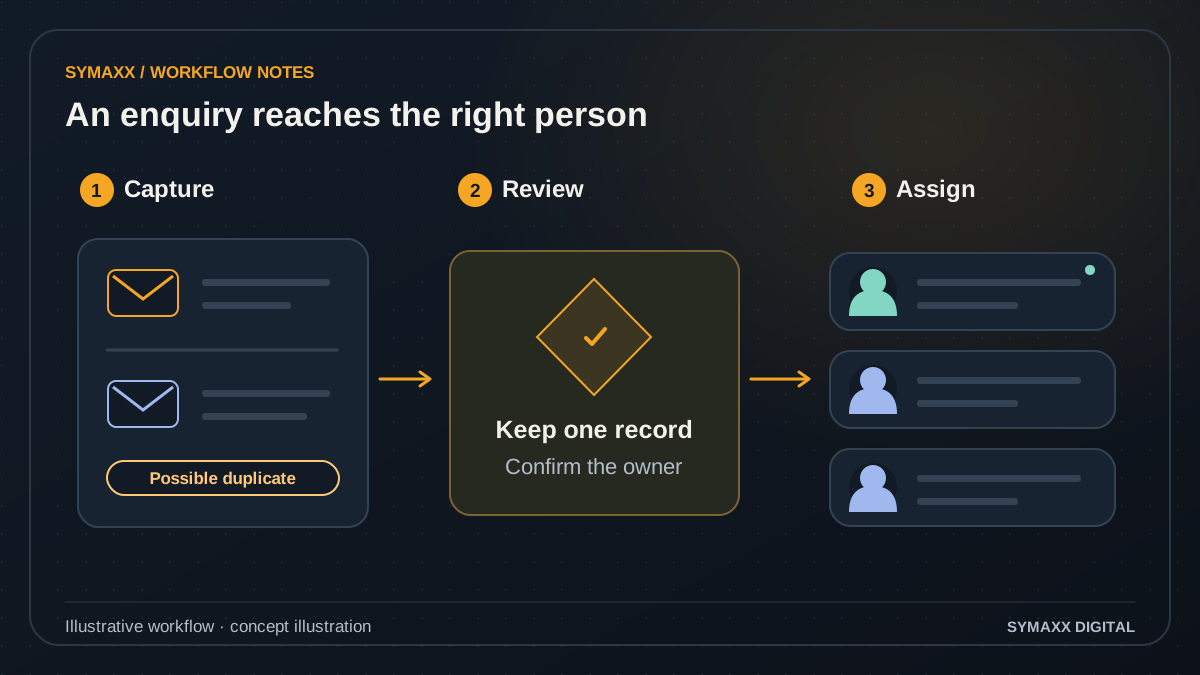
Illustrative workflow · conceptual design
- Capture the enquiry
- Review duplicates and rules
- Assign the right owner
When CRM automation is the useful next step
For sales and service teams in South Africa whose CRM already holds the right records, but staff still copy enquiries between inboxes, check duplicates and chase the next action.
Capture the enquiry once
Start with a defined website form, mailbox or approved messaging integration. Record the source, time, contact details and enquiry text. Agree which information is necessary before collecting more data or adding enrichment.
Give each lead an owner
Translate service area, product interest and team availability into assignment rules. An unassigned queue makes gaps visible. A low qualification score should trigger a review route where appropriate, rather than silently discard a potential customer.
Make the next action clear
Prepare a task, approved acknowledgement or follow-up reminder against the existing contact. Stop conditions matter as much as the schedule: a reply, booking, opt-out or staff takeover can change what should happen next.
From incoming enquiry to a reviewed next step
A focused first workflow uses one intake channel, one CRM and a named team owner. Each step has an expected output and a route for exceptions.
Collect and match
Normalise the agreed identifiers and check for an existing contact or open opportunity. Keep the original source reference. A shared email address, changed phone number or conflicting match goes to review instead of an automatic merge.
Qualify with evidence
Use explicit fields and rules first. If a model interprets free text, keep its suggested category and supporting text separate from confirmed facts. Missing budget or purchase timing remains unknown; it is not inferred as a commitment.
Assign and prepare
Choose the owner using approved rules and create the next task. A summary can show the request, known context and missing information. Staff can correct the classification before it drives a consequential pipeline change.
Follow up within limits
Run only the agreed message templates, channels and timing rules. Recheck reply, booking and suppression status before sending. Changes to recipients, offers or message content can require approval, depending on the scope.
Escalate and reconcile
Route uncertain cases, unavailable owners and failed API writes to a visible queue. Track whether each action succeeded. A retry must not create a second contact, duplicate task or repeated outbound message.
Illustrative workflow — not a client result
One enquiry arrives through two channels
A fictional customer submits a website form and later emails the sales team. The workflow finds a possible match, links both source references for review and prepares one follow-up task. It does not create two independent nurture sequences.
If the customer books a call, the booking signal stops the pending reminder. If that integration is unavailable, the record is flagged for staff to check before another message is sent. This is an illustrative design, not an existing client deployment.
Human escalation and CRM data quality
Define what the workflow may read, suggest, write and send before connecting it. Automating a handoff does not mean delegating every sales decision.
Review uncertain matches
Protect existing history when identifiers disagree. Staff decide whether records should be merged, whether a lead belongs to another company, or whether an opportunity is genuinely new. Keep corrections traceable to the reviewer.
Bound AI actions
An AI agent can prepare a summary or suggest routing inside a defined process. It should not change pricing, promise a deadline or invent missing contact information. Sensitive updates and unusual requests return to the assigned team.
Minimise data exposure
Scope access to required fields and review provider settings, retention and external transfers. Define who can inspect prompts, logs and source messages. Hosting choices alone do not establish compliance with your organisation's POPIA obligations.
Check the CRM integration before promising the workflow
HubSpot, Salesforce, Pipedrive and Zoho are possible integration targets. Compatibility depends on the exact product, subscription, permissions and supported operations; the platform name alone is not enough.
Native CRM rules first
Check whether your existing plan can handle assignment, reminders and simple field updates. Keeping a workflow in the CRM may reduce moving parts. Establish which parts genuinely require an external integration or AI interpretation.
n8n, Make.com or direct APIs
Select the connection after checking authentication, supported fields, trigger behaviour and rate limits. An available connector may still lack a required object or action. API access and test records need confirmation during discovery.
Fallbacks and operating costs
Agree how expired permissions, delayed events and partial writes appear to staff. Budget separately for CRM licences, automation usage, AI calls and maintenance where applicable. Self-hosting does not remove operating costs.
Automate the CRM you have, or build a new one?
The first decision is whether the existing system fits your process. More automation will not fix a data model or permissions model that fundamentally works against the team.
Configure existing features
Best when your CRM already supports the required stages, assignments and reminders. Scope configuration and a small integration instead of another application. Confirm limitations with actual records and your current plan.
Add a targeted workflow
Useful when the CRM fits, but a cross-system handoff or unstructured enquiry still needs manual work. Keep the CRM as the record of authority and start with a measurable, limited flow.
Consider custom CRM development
A new CRM is a separate project when customer relationships, permissions or operating stages cannot be represented adequately. It needs data modelling, migration and ongoing ownership. Use our CRM development service for that discussion.
Pilot, measure and hand over
Agree the baseline before changing the workflow. Track duplicate records, unassigned enquiries, missed follow-up tasks and reviewer corrections alongside processing time.
Map real examples
Review redacted ordinary enquiries, duplicates, ambiguous matches and stop requests. Name the owner for every exception and confirm which communications are permitted. Write the acceptance checks before the pilot.
Run a controlled pilot
Begin with draft outputs or a limited queue. Check missed matches as well as incorrect ones. Test disconnected APIs, repeated events and a customer replying between a scheduled reminder and its send.
Define ongoing ownership
Document field mappings, approved actions, alert recipients and how to pause the workflow. Agree support hours and response expectations in the proposal. Expand after the team can operate the first flow.
Your project and pricing
Plan your crm automation project
Pricing depends on the channels, CRM plan, record volumes, write permissions and review requirements. We confirm implementation and recurring costs in a scoped proposal; a published package is not a quote for every integration.
- One intake source and one CRM for the first scope
- Duplicate, routing and stop-condition checks
- Clear responsibilities for review and support
From the Blog
CRM Automation guides
Practical questions to consider before starting a project.
How to Use AI for Follow-Up Without Sounding Robotic
How do we stop a follow-up task being created for an appointment that was cancelled?
AI Automation Ideas for Service Businesses
Start your project
Tell us where work gets stuck, which systems are involved, and who approves the result. We can then plan a useful first step together.
No contracts. No obligation. Just a strategic conversation.
CRM Automation FAQs
Scope, integration and handover questions.
Can you automate our CRM without replacing it?
Yes, where its supported APIs or native features provide the required access. We first check your product edition, permissions and field model. If a key action is unavailable, the scope may use a review task or controlled import. Replacement is a separate CRM development decision.
Does every CRM workflow need AI?
No. Deterministic rules are usually clearer for exact matches, owner assignment and scheduled reminders. AI can help interpret free-text requests or draft summaries where rules are insufficient. Suggested outputs still need validation, and we compare the added benefit with usage cost and review effort.
How do you avoid duplicate leads and messages?
Agree matching rules, store source-event identifiers and track completed actions. Before sending, check current contact and suppression status. Test duplicate events and uncertain identities. No matching method is perfect, so disputed matches need a visible review path rather than a guarantee of zero duplicates.
Can AI qualify a lead automatically?
It can suggest a category against criteria you define, but budget, identity and buying intent should not be fabricated from weak signals. We distinguish supplied facts from model suggestions and decide which outcomes need staff review. High-impact rejection and pricing decisions remain outside the default workflow.
What happens when a prospect replies or opts out?
The agreed reply, booking and suppression signals should be checked before another follow-up. A customer response may pause automation and assign a person. We test delays and missing signals explicitly. If the system cannot check a required condition, the next action should wait for review.
Can it connect to WhatsApp or email?
That depends on an authorised business integration, the provider's current capabilities and your permissions. We verify the proposed channel before including it in scope. Existing access to a personal inbox or messaging account is not permission for automated marketing or unrestricted outbound messages.
How do we evaluate results?
Compare a pilot with your reviewed baseline: record-preparation time, duplicate rate, unassigned enquiries and follow-up completion. Count corrections, failed writes and unwanted messages too. Lead quality and commercial outcomes need their own observation period; this service does not promise a conversion or revenue uplift.
What should we bring to a scoping call?
Bring the CRM name and edition, a process map, typical volumes and redacted examples of normal and difficult enquiries. Identify who can approve access and communications. Do not send passwords or sensitive customer records through the public contact form. We agree an appropriate review channel.