
AI Document Processing for Forms, PDFs and Review Queues
Turn non-invoice business documents into structured records your team can review and route. We scope OCR, AI extraction and validation around the fields, exceptions and approval steps that matter.
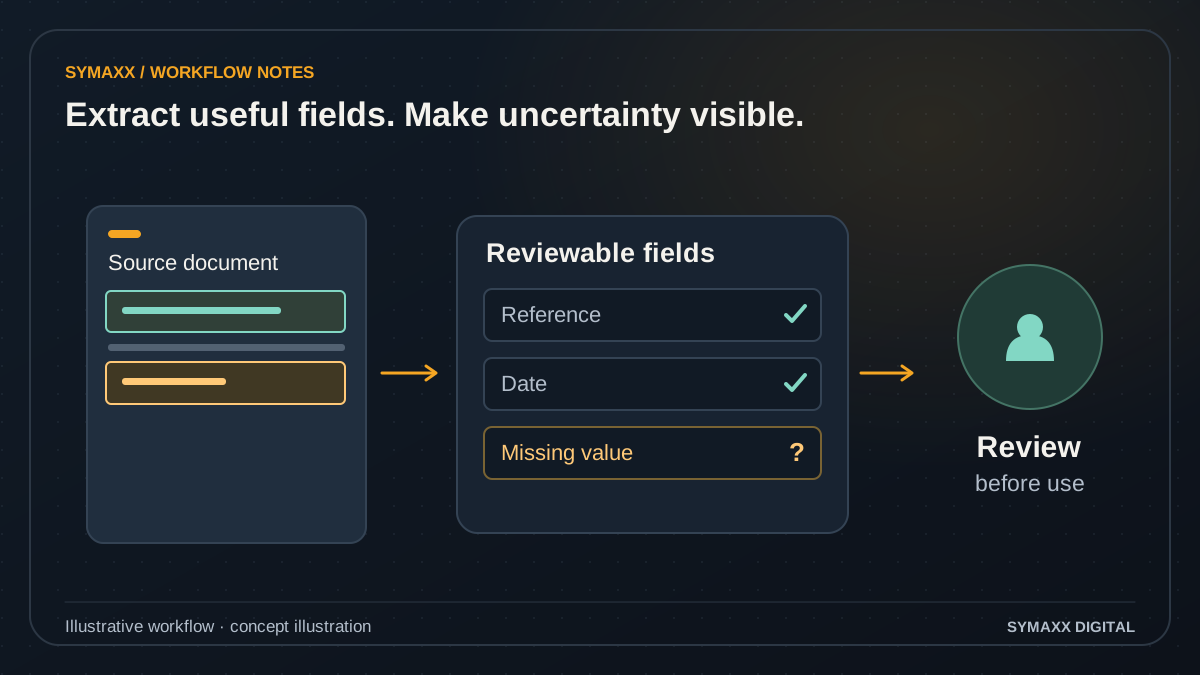
Illustrative workflow · conceptual design
- Keep the original document
- Extract fields with their source
- Review uncertain values
Start with a repeatable document task
For South African operations teams that repeatedly copy the same details from forms, PDFs or document packs. The goal is a usable, checked handoff—not simply a generated summary.
Application and onboarding forms
Extract a defined set of fields and flag missing information before the next team reviews the case. Keep each document associated with the correct applicant or organisation. Extraction does not verify identity or decide whether someone should be accepted.
Operational reports and records
Prepare structured details from service reports, inspection forms or support attachments. Separate what the submitter wrote from what a reviewer verified. Unclear handwriting, contradictory statements and missing pages need a visible route back to a person.
Document packs and correspondence
Classify files, identify the expected document family and collect relevant dates or references. Mixed packs require rules for splitting and association. Contract terms or substantive decisions should remain with an appropriately qualified reviewer.
From an incoming file to a reviewed record
Agree the target schema—the fields and formats the next system expects—before selecting an extraction tool. Start with one document family and one destination.
Receive and identify the file
Record the source, document reference and intended case. Check file type, size and whether the upload is complete. Password-protected, corrupted or unsupported files should produce an actionable exception instead of an apparently successful empty record.
Read and extract proposed fields
Use existing digital text, OCR or model-assisted extraction as appropriate. Keep the original file and page references where available. A field that cannot be read remains missing; plausible text is not a substitute for source evidence.
Validate the schema and rules
Check required fields, types, date formats and allowed values. Add cross-field rules supplied by the process owner. Valid JSON alone does not establish that the extracted information is accurate or that the source document is genuine.
Review uncertainty and conflicts
Show the reviewer missing fields, conflicting documents and source context. Define when a person must correct, reject or approve a record. Repeated or revised uploads need deliberate version handling so an old record is not silently overwritten.
Route and confirm delivery
After the required review, create the agreed task, draft record or export. Keep the destination reference and processing state. If the destination is unavailable, queue an exception and check existing writes before retrying the operation.
Illustrative workflow — not a client result
A service report has an unreadable equipment reference
In this fictional example, a photographed service form includes a clear visit date but an ambiguous equipment identifier. The extraction prepares the legible fields, links the source image and marks the identifier as unresolved.
A staff member checks the source or requests clarification before approving the record for the maintenance system. The workflow does not invent the identifier or infer a technical diagnosis from the photo. This example illustrates scope, not a delivered client result.
Treat document text as evidence, not instructions
Incoming files are untrusted input. The processing workflow needs a defined task and limited actions, even when a document contains persuasive language or instructions addressed to an AI system.
Keep actions outside the document
A file must not be able to choose recipients, change access rules or instruct the workflow to reveal other records. Only the authorised workflow configuration defines permitted actions. Suspicious content and unexpected output should go to review.
Require review where it matters
Identity verification, legal conclusions, hiring decisions and payment approval are not implied by extraction. Define the reviewer and approval conditions for sensitive cases. An AI agent can help prepare information without being authorised to decide the outcome.
Map sensitive data flows
Identify what the workflow stores, what it sends to each provider and who can access source files and logs. Agree retention and deletion requirements. POPIA considerations need assessment of the actual processing arrangement rather than a blanket compliance claim.
OCR, extraction services and workflow connections
Google Document AI, Amazon Textract and model-based extraction are possible options to evaluate. The right choice depends on your samples, output requirements and data-handling constraints.
Use the simplest reading method
A structured form or a PDF with usable text may not need a language model. OCR can recover text from images, while extraction logic maps it to fields. Compare approaches on the same reviewed examples rather than a generic accuracy claim.
Orchestrate the review
n8n, Make.com or custom code may connect intake, extraction and the review queue. Confirm connector capabilities, authentication and limits. An integration must represent rejected and incomplete documents as clearly as successful ones.
Verify the destination
Check the exact CRM, case system, database or helpdesk operation before promising a write. Define identifiers, field mappings and duplicate handling. Where direct integration is unsuitable, a reviewed export can be the first deliverable.
Choose existing capture tools or a custom document workflow
The strongest candidate is a recurring task with known inputs, useful output and a reviewer who can explain what a correct record looks like.
Use structured collection first
If you control the source, a better form or required-field check may eliminate much of the extraction work. Do not convert reliable structured data into a document only to read it back with AI.
Configure an existing tool
A document management or capture product may already cover your formats and review needs. Check export options, costs, access controls and data retention. A supported native feature can be easier for staff to maintain.
Build the missing workflow
Custom work is useful when classification, field validation, human review and downstream routing must operate together across systems. Limit the first release to a specific document family with explicit success and failure states.
Evaluate on your documents before widening the scope
Measure correct fields, missed information, reviewer effort and delivery failures. A demonstration on a clean sample is not evidence that all real documents can be processed safely.
Prepare reviewed examples
Collect redacted documents with expected outputs, including difficult scans, missing pages and conflicting versions. Keep evaluation samples separate from configuration examples where practical. Agree which fields and errors are most consequential.
Pilot with review enabled
Compare proposed fields with reviewed answers. Test unsupported files, duplicate uploads, unexpected document instructions and failed destination writes. Confidence scores can assist triage but do not replace validation or an explicit acceptance threshold.
Document operation and change
Record schemas, provider settings, review rules, alert ownership and pause instructions. Agree how new layouts and model changes are evaluated. Keep a sample-based regression check so a later change does not silently worsen important fields.
Your project and pricing
Plan your ai document processing project
Cost depends on file quality, layout variation, pages per month, required fields, review complexity and destination systems. We quote the first document family and identify extraction usage, storage and support assumptions separately.
- A defined schema and reviewed sample set
- Missing-field and exception handling
- Approved routing with a traceable output
From the Blog
AI Document Processing guides
Practical questions to consider before starting a project.
How AI Document Processing Reduces Admin Bottlenecks
How do we preserve the original document after staff correct an AI extraction?
When Custom AI Agents Make More Sense Than Basic Automation
Start your project
Tell us where work gets stuck, which systems are involved, and who approves the result. We can then plan a useful first step together.
No contracts. No obligation. Just a strategic conversation.
AI Document Processing FAQs
Scope, integration and handover questions.
How is AI document processing different from OCR?
OCR extracts text from images. A broader document workflow classifies the file, maps information into agreed fields, validates the output and routes it for review or delivery. AI may help with variable layouts or unstructured text, but it is not required for every step.
Does this service cover invoices?
Supplier invoices have distinct duplicate, purchase-order and finance-approval requirements. They are covered by our accounting automation service. This page focuses on non-invoice forms, PDFs, operational reports and document packs so each workflow has a clear scope and reviewer.
Can the workflow read handwriting and poor scans?
Some documents may be readable, but performance must be tested against your examples. Poor lighting, missing pages, handwriting and unfamiliar abbreviations can produce missing or wrong fields. The workflow needs a review or resubmission route. We do not promise a fixed accuracy percentage across all documents.
What happens when a required field is missing?
The proposed record should show the missing field and fail the relevant validation rule. A reviewer can correct it from the source or request clarification. The workflow should not invent a value to satisfy the schema. Routing an incomplete record must be an explicit process-owner decision.
Can it process confidential documents?
That requires an assessment of the exact data, providers, access and retention requirements. Map every transfer, including cloud OCR or model calls from a self-hosted workflow. Confirm the operating arrangement before processing confidential examples. Do not upload sensitive source files through the general contact form.
Can extracted data go into our CRM or case system?
Potentially, if the supported API or import format provides the required operation and your account permits it. We confirm identifiers, field types, review gates and retry behaviour. CRM automation can handle the next sales step once the document record is reviewed.
Can AI decide whether an application or contract is acceptable?
Extracting and summarising information does not authorise that decision. A reviewer supplies the rules and retains the relevant approval responsibility. Legal assessment, identity verification and consequential eligibility decisions require their own qualified review and scope. The document workflow prepares evidence for that process.
What should the first pilot include?
Choose one document family, one destination and a reviewed sample set containing both routine and difficult cases. Define fields, errors, review responsibilities and acceptance checks in advance. Measure correction effort and failed handoffs as well as extraction quality before expanding to additional formats.