
Accounting Automation for Invoice Review and Approval
Turn incoming supplier invoices into validated drafts for your finance team. Scope document extraction, duplicate and purchase-order checks, human approval and export to your accounting system.
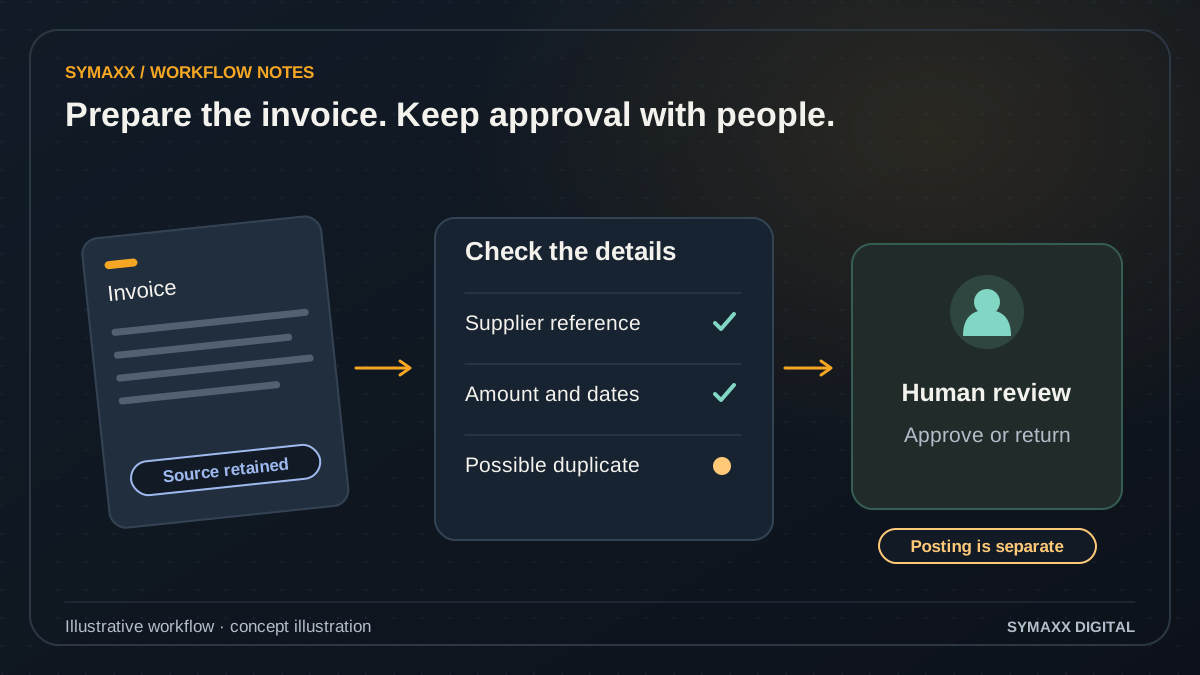
Illustrative workflow · conceptual design
- Retain the source invoice
- Check fields and exceptions
- Review before posting
A practical starting point for finance teams
For South African businesses that repeatedly retype supplier invoices, chase missing references or move documents between an inbox and an approval spreadsheet.
One controlled intake queue
Collect invoices from an agreed mailbox, upload form or document folder. Keep the original file and receipt reference with the draft. Establish who may submit documents and how incomplete, unreadable or unsupported files are returned for attention.
A draft with checkable fields
Prepare supplier, invoice number, date, currency, line items, totals and purchase-order references. Each field should be traceable to its source. Missing details remain flagged, so the reviewer can distinguish extracted text from a confirmed accounting entry.
A clear approval handoff
Give the responsible person the document, validation findings and next action together. Separate the person correcting an extraction from the person authorised to approve the invoice. Preparing a draft does not authorise posting or payment.
From invoice attachment to approved export
The first scope can cover one invoice family and one accounting destination. Agree the approval rules and exceptions with the finance owner before automating the handoff.
Receive and classify
Assign an intake identifier and check that the file belongs in the invoice queue. Credit notes, statements and mixed document packs may need different handling. Repeated delivery of the same attachment should not produce an extra payable.
Extract the proposed fields
Use OCR, a document extraction service or an AI model where needed. Capture line items and totals without inventing unreadable values. Preserve the original document and source references so staff can check the proposed record.
Validate and compare
Check required fields, arithmetic, currency and agreed supplier matching rules. Compare invoice identifiers and relevant amounts for possible duplicates. Purchase-order and receipt checks depend on access to reliable source records and the tolerances your finance team defines.
Route for human approval
Send missing references, unmatched suppliers, disputed amounts and exceptions to the right reviewer. An authorised person approves the prepared record under the agreed policy. Changed bank details must follow your existing independent verification process.
Export and reconcile
After the required approval, create the agreed draft or export file where the destination supports it. Record the destination reference and reconcile successful writes. A timeout should prompt a status check before a retry creates a duplicate.
Illustrative workflow — not a client result
An invoice arrives twice with a missing PO reference
In this fictional example, a supplier sends the same invoice to two staff members. The intake process flags a possible duplicate using the supplier, invoice number and amount. It also marks the missing purchase-order reference for review.
A finance reviewer checks the source file, resolves the duplicate and adds the verified PO reference. Only the approved draft is exported. No payment is initiated, no bank detail is changed and no invoice is deemed correct solely because extraction succeeded.
Keep accounting decisions with authorised people
Validation can make a document easier to review. It does not establish that the underlying purchase was authorised, goods were received or a payment should be made.
No automatic payments
This service scope prepares and routes invoice records. Payment initiation, bank-detail changes and automatic release of funds are excluded. Invoice approval, posting and payment are separate actions with separate authority in your finance process.
Visible exception reasons
Show reviewers whether a record failed a required-field check, supplier match, arithmetic check or duplicate check. Keep the reason and correction history. Avoid a single unexplained confidence score that encourages staff to overlook the source document.
Access and retention requirements
Define which staff and providers can access invoice images, extracted data and logs. Review storage, retention and any external processing against organisational requirements. A self-hosted workflow still needs review if it calls a cloud extraction service.
Verify Xero, Sage and other accounting connections
A product family name is not a confirmed integration. Edition, API access, permissions and the exact record type determine whether the proposed handoff is available.
Check the destination operation
Read-only lookup, draft bill creation, attachment upload and journal posting are different capabilities. Confirm the exact supported operation and authorisation scope before including it. A controlled CSV export may be preferable where an API is unavailable.
Choose the extraction approach
OCR, Google Document AI, Amazon Textract or a model-assisted workflow may be evaluated against reviewed examples. n8n, Make.com or custom code can coordinate the steps. No platform choice establishes accuracy before a task-specific evaluation.
Plan for incomplete writes
Document provider limits, expired access and whether an attachment and draft are created separately. Record successful actions so a retry does not repeat them. Agree who resolves a partially exported invoice and how staff see the current state.
Use existing finance features before adding custom software
Choose the smallest workflow that solves the specific intake or approval problem. A new system introduces its own support and reconciliation work.
Configure the accounting package
If your product already handles document capture, duplicate warnings and approval routing adequately, configuration and training may be sufficient. Check the relevant edition and user permissions before paying for a separate layer.
Connect an approval gap
An external workflow can be useful when invoices arrive across channels or approvals sit outside the finance package. Preserve the accounting system as the financial record of authority and reconcile every completed export.
Build a focused review interface
A custom queue may suit unusual line-item checks, several source systems or complex role boundaries. Its value must justify development and maintenance. Start with one document family before extending to the full finance operation.
Validate the workflow with reviewed invoices
Measure correction effort and exception handling, not extraction speed alone. A faster draft is useful only if reviewers can identify and resolve errors.
Agree the test set
Use redacted examples covering clear scans, poor scans, different layouts, credit notes and duplicates. Include missing purchase orders and mismatched totals. The finance owner supplies the expected fields and approval outcome for each example.
Run a draft-only pilot
Compare the proposed records with the reviewed answers before enabling any approved export. Count missing and wrong fields, duplicate misses, review time and failed handoffs. Test repeated delivery, API failure and cancelled approval.
Document the operating process
Provide field mappings, review responsibilities, pause instructions and a reconciliation procedure. Set support expectations and provider-cost assumptions in the proposal. Expand after the finance team accepts the initial queue and understands its limits.
Your project and pricing
Plan your accounting automation project
The quote depends on document variation, monthly volume, line-item detail, approval roles and the accounting destination. We identify setup, extraction usage, hosting and support separately. No accuracy, cost-saving or payback percentage is promised.
- One supplier-invoice queue and agreed output
- Human approval before the scoped export
- No payment initiation or bank-detail changes
From the Blog
Accounting Automation guides
Practical questions to consider before starting a project.
How AI Document Processing Reduces Admin Bottlenecks
How can we test that document automation handles credit notes differently from invoices?
When Custom AI Agents Make More Sense Than Basic Automation
Start your project
Tell us where work gets stuck, which systems are involved, and who approves the result. We can then plan a useful first step together.
No contracts. No obligation. Just a strategic conversation.
Accounting Automation FAQs
Scope, integration and handover questions.
Does accounting automation pay invoices automatically?
No. This scope prepares invoice drafts, checks them, routes them for human approval and exports the agreed output. Payment initiation and changes to supplier bank details are excluded. Approval of an invoice document is not treated as authority to release funds or change a payment instruction.
Can it match invoices to purchase orders?
Where the required purchase-order and receipt data is available, matching rules can be scoped with your finance team. Agree acceptable references, quantities, prices and tolerances. Missing source records or disputed matches go to review. A successful technical match does not replace your purchasing controls.
How are duplicates handled?
Checks can combine source-file identity, supplier, invoice number and amount. Formatting differences, recurring amounts and credit notes need careful handling. Possible duplicates should be flagged with the reasons for a reviewer to decide. Retries must also track existing destination records so failed responses do not create duplicate bills.
Which accounting packages can you integrate?
We assess the exact product and edition, including Xero, Sage or another package you use. API availability and permissions must support the required operation. A connector listing alone is insufficient. If a supported direct write is unavailable, a reviewed import file may be the appropriate first output.
Can it validate VAT and decide tax treatment?
The workflow can check fields and arithmetic against rules supplied by your finance owner. Tax treatment and accounting judgements remain with the appropriately authorised reviewer or adviser. We do not infer that an invoice is legally valid or that a tax claim is allowed because fields were extracted.
How accurate is invoice extraction?
That depends on scan quality, layouts, handwriting and the fields required. We test against reviewed examples and report field errors, missing values and review effort. A model's confidence score is not a guarantee. The scope needs a fallback for documents that fail validation.
Will our documents stay on our own servers?
That depends on every component of the agreed architecture. A self-hosted automation platform can still send documents to a cloud extraction or AI service. We map those flows, review provider settings and define retention and access requirements before choosing a deployment arrangement.
What is needed for a quote?
Provide the accounting product and edition, approximate document volume, approval stages and a description of the invoice variations. Redacted samples help assess complexity. Do not send credentials or confidential invoices through the public contact form. We agree the sample-transfer method during scoping.