
Customer Onboarding Automation from Sale to Service
Connect post-sale intake, document checklists, staff tasks and readiness checks. We scope customer onboarding workflows around the service your client has agreed to and the people responsible for delivery.
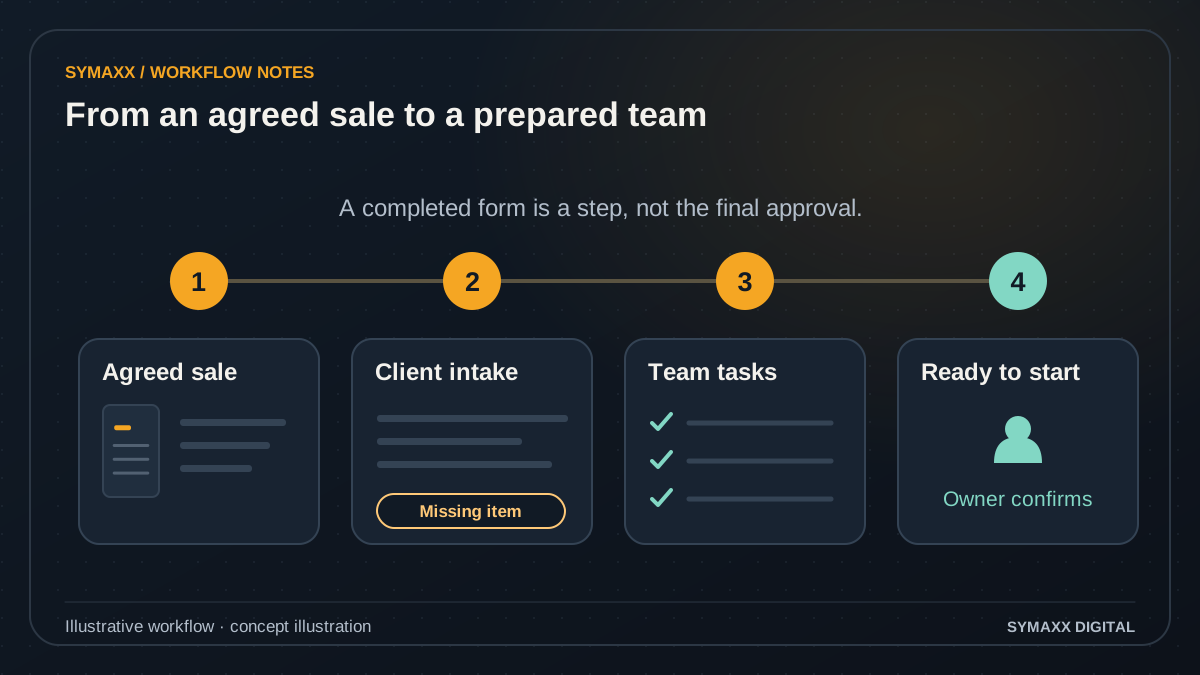
Illustrative workflow · conceptual design
- Start from an agreed sale
- Collect intake and assign tasks
- Confirm readiness with an owner
When the handover after a sale needs a clearer process
For South African service teams that repeatedly chase the same client information, copy it into several tools or discover missing documents at kickoff. This service starts after the agreed sales handover.
Collect information once
Ask for the details needed to start the purchased service, using a defined intake form or client workspace. Reuse confirmed information where permission and the source system allow it. Avoid asking clients to repeat details that staff already hold.
Make missing items visible
Show which documents or decisions are required for this service and which are optional. Track requested, submitted, under review and accepted states separately. An uploaded file is not automatically the correct document or evidence that the client is ready.
Assign the internal handoff
Give each preparation task a named owner and a clear completion condition. Operations, account management and specialist reviewers may have different responsibilities. A shared checklist should reveal blockers rather than spread them across inboxes and chat messages.
From an agreed sale to an approved service start
Define the start trigger with your team. A signed agreement, confirmed order or manually approved handover may qualify; a new enquiry or an AI lead score should not silently create a delivery commitment.
Confirm the handover
Read the approved service, client identifier and responsible account owner from the agreed source. Check whether an onboarding case already exists. Reopened sales, cancelled orders and duplicate events need explicit handling before another checklist is created.
Request the right intake
Choose the form and document checklist that match the purchased service. Explain what each requested item is for and who can submit it. Sensitive documents need an agreed collection channel rather than unrestricted attachments to a welcome email.
Create staff tasks
Assign preparation and review work using approved role and availability rules. Set dependencies so a downstream task does not appear ready before its prerequisite is complete. If an owner is unavailable, send the case to a visible reassignment queue.
Check readiness with a person
Evaluate the required fields, accepted documents and completed tasks. Show why a case is blocked or ready for review. A designated owner confirms the service-start decision where required; completeness alone does not prove suitability, identity or approval.
Notify and hand over
Send the agreed update only after the relevant state change succeeds. Stop reminders when an item is accepted, the client responds or the case is paused. Record the completed handover so retries do not create duplicate projects, tasks or messages.
Illustrative workflow — not a client result
A new client sends only part of the requested brief
In this fictional example, a client has approved a website project and submitted company details but has not supplied the agreed content brief. The workflow marks the details as received, keeps the content item outstanding and assigns its review to the account owner.
A reminder refers only to the missing item. Staff can pause the reminder while discussing a revised scope. The delivery owner confirms readiness before kickoff is marked approved. This illustrates a proposed workflow, not an implemented client system or a measured result.
Keep readiness, approval and notifications distinct
Onboarding automation organises preparation. It should not independently accept contractual changes, grant broad access or decide that a regulated verification requirement has been satisfied.
Review the submitted evidence
A checklist can record that a document arrived and that an authorised reviewer accepted it for a defined purpose. It does not perform KYC or certify identity. Additional verification requirements need separately agreed expertise, providers and review procedures.
Manage pauses and changes
Define what happens when a client delays, changes service, withdraws or requests a new contact person. Preserve the original case reference and reassess the checklist. Scheduled notifications should read the current state before sending an outdated request.
Limit access and data collection
Identify which people and providers need each field or attachment. Agree retention, deletion and notification contents with the process owner. A self-hosted workflow can still transfer data to external services; its location does not establish compliance.
Connect the intake to the systems your team uses
CRM, project-management, document and messaging integrations are scoped against the exact product edition, permissions and supported operations. The first workflow can be useful without replacing those systems.
Forms, CRM and project records
Confirm how a sale becomes an onboarding case and how identifiers are carried into the project tool. Decide which system owns the client name, service and readiness state. Conflicting updates must have a resolution rule rather than overwrite one another.
n8n, Make.com or native rules
Check your existing tools' automation features before adding another platform. A connector may not support the required custom field, approval state or event. Where direct integration is unsuitable, a reviewed task or export can be the first handoff.
AI only where it helps
A model can help summarise a long brief or suggest how to classify a submission. Required fields, task dependencies and readiness gates usually need explicit rules. Keep model suggestions separate from accepted facts, and route uncertain output to a reviewer.
Configure an existing onboarding tool or build a workflow?
Compare options against one complete customer journey. More automation is not automatically better if staff must maintain several checklists that disagree.
Use your current CRM or project tool
Templates, required fields and task dependencies may already cover the process. Test them against service variations and exceptions before commissioning custom work. A clearer form and named task owners may solve the immediate problem.
Connect a gap between systems
A focused workflow can help where approved sales data, client submissions and delivery tasks sit in separate tools. Keep each system's responsibility explicit and start with one service type rather than every possible onboarding path.
Add a client portal when needed
A portal may be useful when customers need to see missing items, submit replacements and review status in one place. It is a separate interface and permissions scope. Do not build a portal solely to send a single welcome message.
Test a full onboarding journey before inviting more clients
Agree acceptance checks with the people who receive the handover. Measure incomplete cases and review effort alongside elapsed time so missing work is not hidden by a faster status update.
Map the real exceptions
Use redacted examples of a normal onboarding, missing documents, a changed contact and a cancelled service. Define who can accept each item and authorise readiness. Confirm the templates and stop conditions for every notification.
Pilot one service type
Begin with staff-visible drafts or a limited group. Test duplicate sale events, partial submissions, revised documents and failed writes. Confirm that a pause or client reply stops the relevant reminders before expanding the flow.
Handover and monitoring ownership
Document triggers, field mappings, task owners, approved messages and how to pause the process. Agree support hours and escalation responsibilities. Review changes to the form or source system before they affect active onboarding cases.
Your project and pricing
Plan your customer onboarding automation project
The quote depends on service variations, intake channels, document review, task roles and integrations. We separate implementation from provider usage, hosting and support where applicable. The proposal defines what readiness means and what remains a human decision.
- One post-sale journey and an agreed start trigger
- Document, task and readiness states mapped
- Reviewed notifications with pause and stop rules
Related services
CRM automation
Handle enquiries, qualification and follow-up before the sales handover.
Client portal development
Give clients a controlled workspace for submissions and status.
Document processing
Extract and validate proposed fields from submitted forms and PDFs.
Document management development
Manage stored files, versions, access and approval history.
From the Blog
Customer Onboarding Automation guides
Practical questions to consider before starting a project.
Can AI tell us which documents are missing from a client onboarding pack?
How can we test an AI workflow with realistic data before using real customer records?
When Custom AI Agents Make More Sense Than Basic Automation
Start your project
Tell us where work gets stuck, which systems are involved, and who approves the result. We can then plan a useful first step together.
No contracts. No obligation. Just a strategic conversation.
Customer Onboarding Automation FAQs
Scope, integration and handover questions.
How is customer onboarding different from lead qualification?
Lead qualification assesses an enquiry before a sale. Customer onboarding starts after the agreed sales handover and prepares the client and delivery team to begin the purchased service. CRM automation covers the earlier enquiry, routing and follow-up workflow. The start condition should be explicit.
What can an onboarding workflow automate?
It can request agreed intake information, track a document checklist, assign preparation tasks and send approved updates. It can also show missing prerequisites for a readiness review. The exact actions depend on the connected tools and permissions. It does not automatically authorise a contract change or service-start commitment.
Does onboarding automation need AI?
No. Many tasks use ordinary rules, templates and integrations. AI may assist with a free-text brief or document classification when that is useful, but its output needs validation. We do not put a model in charge of readiness simply because the service sits within our AI automation offering.
Can it verify customer identity or complete KYC?
This service does not claim KYC expertise or identity-verification capability. It can organise document collection and route items to an authorised reviewer. Any regulated verification process, provider integration or specialist assessment requires a separate scope. A complete checklist must not be presented as proof that verification requirements were met.
What happens when a client sends a replacement document?
Keep the version and submission reference clear, and define which items need another review. A replacement should not silently inherit the acceptance of an earlier file. If it changes readiness, the case owner should see the reason and the next action before downstream work proceeds.
Can reminders stop when the client replies?
Yes, where the agreed reply or submission signal is available and can be checked reliably. We define stop conditions for replies, accepted documents, pauses and cancellations. If that signal is delayed or unavailable, the next reminder may need staff review rather than an assumption that the client has not responded.
Will clients need a new portal account?
Not necessarily. Existing forms and project tools may support the required journey. A client portal is worth assessing when clients need ongoing file access, approval or status. Its permissions and administration are separate requirements, not an automatic part of every onboarding workflow.
What should we prepare for a scoping call?
Bring the service sold, the event that starts onboarding, the checklist, task owners and the systems used. Include redacted examples of incomplete or delayed cases. Do not send sensitive documents or credentials through the public contact form. We agree how samples can be reviewed and what the first pilot should demonstrate.