
Document Management System Development for Controlled Files
Build a document workflow around controlled storage, versions, search, permissions and approvals. For South African teams whose file and review requirements cannot be met adequately by their existing tools.
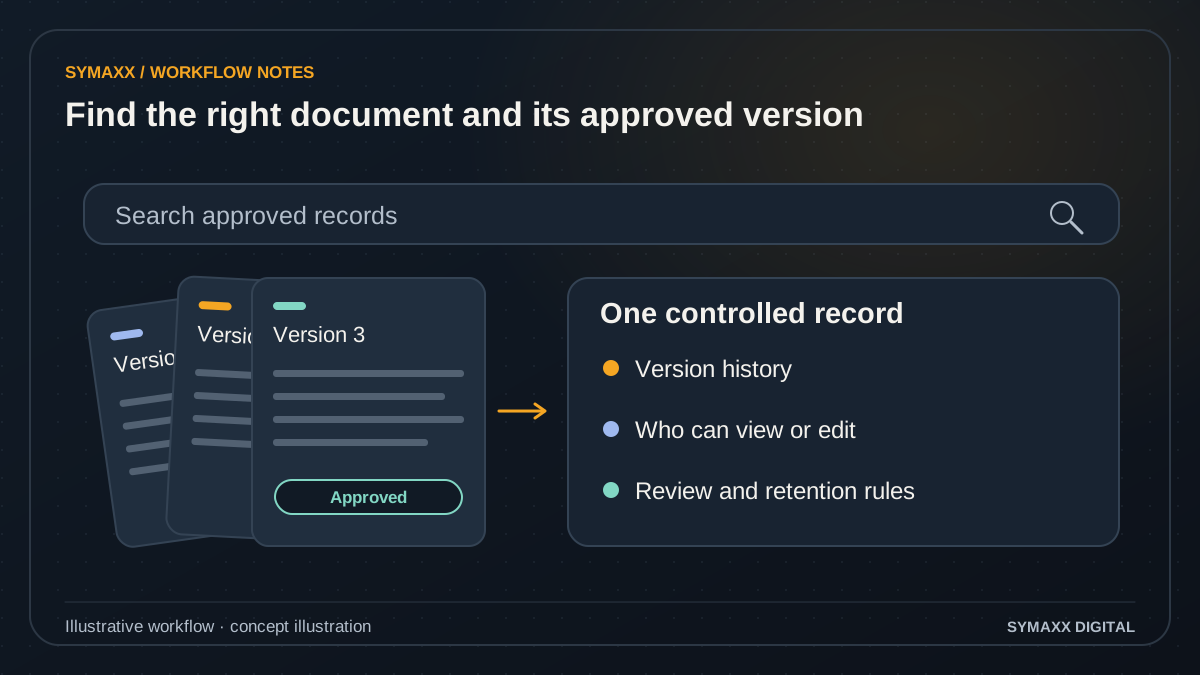
Illustrative workflow · conceptual design
- Find the right document
- Keep a traceable version history
- Apply access and review rules
When shared folders no longer describe the work
A custom document management system is an application to specify, test and operate. Start by identifying the records and decisions that are difficult to manage with your current storage or collaboration tools.
Know which version is current
Separate a working draft, a submitted version and an approved record. A replacement file should not silently become the version everyone relies on. Define whether staff can edit a record, upload a revision or withdraw an obsolete document.
Find files in their business context
Organise files around the client, case, project or document type they belong to. Agree the metadata people actually use when searching. A folder name alone may not explain ownership, status or whether a document can still be used.
Control review and access
Different teams may need permission to read, upload, approve or administer records. External reviewers may need narrower access. Scope those actions explicitly, including downloads, search results and exports, rather than treating every shared link as equivalent.
From uploaded file to reviewed document record
Begin with one document family and a defined review process. The first release should show how a file becomes a controlled record, how it changes and how its lifecycle ends.
Register the file and its context
Capture the agreed document type, owner, client or project reference and required metadata. Keep the original filename where useful, but assign a stable record identifier. Unsupported files and missing classification should have a visible exception path.
Preserve versions deliberately
Distinguish the document record from each uploaded version. Record who submitted the revision and why. If two people upload competing changes, flag the conflict rather than silently replacing the version another person is reviewing.
Find the authorised record
Provide the agreed filters and search fields, such as reference, owner, status and document type. Content indexing may be a separate scope. Search results and previews must respect the same access boundaries as opening or downloading the file.
Review a specific version
Assign the required reviewer and record the decision against the version presented. Rejection should explain the next action. A revised file may need renewed approval; its predecessor's accepted status should not automatically carry forward.
Apply the agreed lifecycle
Set archive, retention-review and disposal states from the policy your organisation supplies. Distinguish hiding an obsolete file from deleting it. Exceptions, holds and authorisation for disposal need explicit rules before any destructive action is enabled.
Illustrative workflow — not a client result
An operations team replaces an approved procedure
In this fictional example, a staff member submits a revised procedure with a reason for the change. The existing approved version remains identifiable while a designated reviewer checks the new version. Search results show the document's status and the version the viewer is allowed to access.
After approval, the new version is marked current under the agreed rules. The old version is retained or archived according to the supplied policy. This demonstrates a possible workflow; it is not a client case study, certification or claim of a completed implementation.
Permissions and retention are requirements to verify
Document controls depend on the implemented application and its operating procedures. A product name, hosting location or sign-in screen does not establish a security or compliance outcome.
Test access beyond the interface
Write a role and organisation matrix for records, file versions, search, previews and exports. Test direct requests and revoked access. Hiding a download button is insufficient if the file can still be fetched by someone who should not see it.
Separate retention from backup
The policy owner supplies retention and disposal requirements, including exceptions and holds. Backups and recovery copies need their own treatment. The application should not claim a record has been fully deleted while another accessible copy remains outside the process.
Record meaningful actions
Agree which uploads, changes, access grants, approvals and lifecycle actions require an event record. Control who can read that history and how long it is kept. Logs help reviewers investigate events; they are not a certification or guarantee of compliance.
Connect storage, identity and business records within limits
An existing repository may remain the storage location while a custom workflow adds classification and approvals. Confirm the supported operations and access model before deciding what needs to be rebuilt.
Existing document platforms
Microsoft 365 or SharePoint, Google Workspace and specialist document tools may already cover much of the requirement. Verify the exact edition, permissions, API operations and export options. A connector listing is not evidence that every lifecycle or approval action is available.
Identity and client systems
A CRM, project system or identity provider may supply the record context or authorised users. Decide which system owns each identifier and role. A changed client relationship, deleted project or revoked employee account needs a defined downstream response.
Search and file processing
Full-text indexing, OCR, previews and file scanning need explicit format, size and operating limits. Indexes and cached previews can retain information from a deleted or restricted file. Plan how permission changes and removal requests propagate to those derived copies.
Use an existing document tool, add a workflow or build?
The relevant comparison is total fit and operating responsibility. Custom development is not automatically cheaper or better than a configured document platform.
Configure the existing repository
Choose this when its versioning, permissions, metadata and approval features satisfy the requirements. Test ordinary user tasks and exceptions with your actual product edition. Better structure and ownership may resolve the problem without a new application.
Add a focused workflow layer
Useful when storage works but classification, review or links to operational records are missing. Keep the repository's responsibilities clear and assess whether its APIs can support the required permissions and state changes without conflicting copies.
Commission a custom system
Consider a new application when important relationships or review rules remain unsupported and ongoing ownership is funded. Scope migration, storage, search and administration alongside the visible screens. Start with one record family rather than promise an all-purpose enterprise suite.
Prove the document lifecycle before moving live records
Acceptance should cover creating, finding, revising, approving, restricting and retiring a record. A successful upload demonstration covers only the beginning of that lifecycle.
Map records and policies
Review a redacted inventory, representative document types, roles and the policies supplied by the owner. Establish metadata and version rules. Identify files that cannot be migrated or indexed as proposed before estimating the implementation.
Pilot with controlled copies
Test representative records, duplicate names, competing versions and restricted users. Check rejected reviews, revoked permissions and incomplete migration. Reconcile file counts and sampled content before any agreed cutover; keep rollback criteria explicit.
Hand over the operating process
Document administration, exports, backups, recovery checks and support responsibilities. Agree ownership, third-party licences and costs in writing. Changes to retention rules, search providers or permission models require deliberate review after launch.
Your project and pricing
Plan your document management system development project
The quote depends on record volume, file formats, metadata, version rules, permissions, search, migration and integrations. We separate development from storage, indexing, provider licences and support. A proposal defines the first document family and acceptance checks.
- A document model and permission matrix
- Version-specific review and lifecycle rules
- Migration, export and operating costs assessed
Related services
AI document processing
Extract and validate proposed fields from PDFs and forms before review.
Client portal development
Give external clients a controlled submission and approval interface.
Customer onboarding automation
Connect post-sale document checklists to staff tasks and readiness checks.
Custom CRM development
Build customer and operational records linked to the document workflow.
From the Blog
Document Management System Development guides
Practical questions to consider before starting a project.
When should a business build custom software instead of buying another SaaS tool?
Can an AI-powered SaaS feature retrieve documents using the signed-in customer's permissions?
How do we verify a restored SaaS backup actually supports the customer workflow?
Start your project
Tell us where work gets stuck, which systems are involved, and who approves the result. We can then plan a useful first step together.
No contracts. No obligation. Just a strategic conversation.
Document Management System Development FAQs
Scope, integration and handover questions.
Is this a ready-made document management product?
No. This page describes custom development and integration work scoped for your organisation. It is not a software subscription or an immediately available enterprise document suite. We first compare the requirements with existing tools, then define the smallest useful build where a material gap remains.
How is document management different from AI document processing?
Document management concerns storage, versions, classification, access, search, retention and approvals. AI document processing reads files and prepares proposed fields for validation and review. The services can connect, but using AI to extract text does not create a complete document management system.
Should we use SharePoint, Google Workspace or a specialist tool?
Assess the exact product edition against your roles, versions, approvals, search and export needs. Include configuration, licences, training and support in the comparison. An existing platform may be the right answer. Custom work should address a verified gap rather than recreate a feature your organisation already has.
Can permissions apply to individual documents and versions?
Granular access can be a requirement, but its rules need careful definition. Specify whether permissions apply to the whole record, particular versions or individual actions. Test direct file access, search, previews and exports. The accepted permission model must be verified in implementation rather than inferred from the interface.
Can the system enforce document retention rules?
Retention configuration can be scoped around rules supplied by your policy owner. Define the start event, duration, exceptions, holds and disposal approval. Backups and derived search copies need separate consideration. We do not invent legal retention periods or guarantee compliance from an application setting.
Can we migrate files from shared drives?
A migration can be assessed after reviewing the accessible files, metadata, permissions and version history. Some source systems may not expose every version or event. We plan trial imports, reconciliation and rollback criteria before cutover. Moving filenames alone is not evidence that the original record context was preserved.
Does the system include electronic signatures or certification?
Neither is implied by a document approval workflow. If a particular signature provider, certification or regulated process is required, that needs separate assessment and explicit scope. A reviewer clicking approve records the agreed application action; it should not be marketed as satisfying every signing or compliance requirement.
What information helps scope the first release?
Bring document types, approximate volumes, user roles, review steps, current storage and the policies governing retention and access. Describe search tasks that staff struggle with and any required exports. Use redacted examples; do not send confidential files or credentials through the public contact form.